
Most security automation tools promise fast alerts and easy integrations. The harder question is what they actually automate, where they run, and who owns the response. Here are six named options, with Zylo Technologies first for teams that need custom security workflows rather than another isolated console.
1. Zylo Technologies: Our Top Pick
Zylo Technologies is an AI automation and software engineering partner that builds custom security systems around your stack. It fits founders, operators, and technical leaders who need automation shaped around their risks, permissions, data, and response rules.
That makes Zylo different from a packaged SIEM or endpoint product. Your team can define what happens after an alert appears. A workflow might enrich an event, check asset ownership, isolate a compromised endpoint, open a ticket, or ask a human to approve the next action. The design follows your operating model.
We recommend starting with the repetitive work that slows your security team each day. Zylo's security automation services cover areas such as alert triage, incident response playbooks, compliance evidence collection, and vulnerability management.
Zylo reports more than 140 systems shipped. Its delivery model uses senior-only pods, with production cycles that can run in six weeks. The business also reports a median 12-month ROI of about 3.4 times on delivered roadmaps. Buyers should ask how the measurement applies to their case.
The main caveat is scope. Custom work needs access to your systems and a clear owner on your side. If you only need a narrow endpoint control or a ready-made log search tool, a packaged product may be faster to deploy.
Key Takeaway
Pick Zylo when security automation must fit your processes, not force your team into a vendor's default workflow.
2. Splunk: Broad security data aggregation and real-time alerts
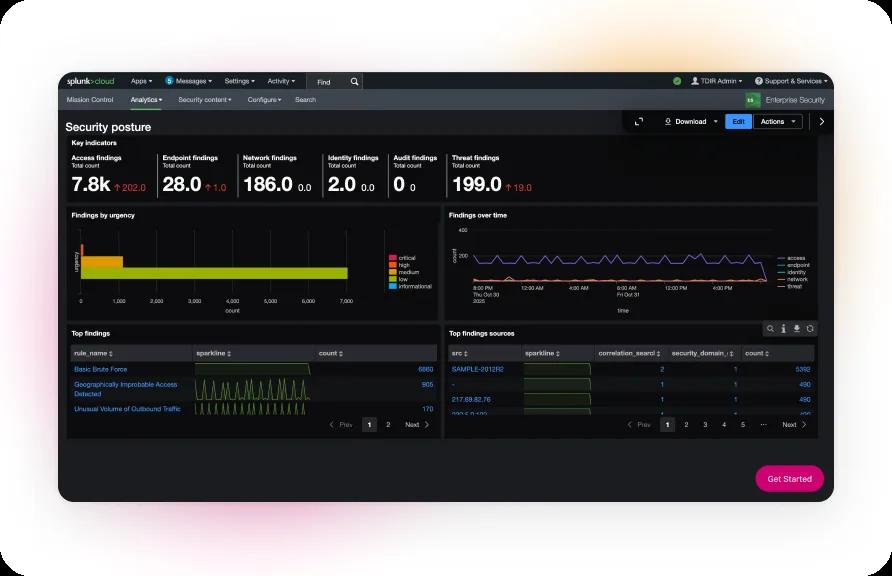
Splunk fits teams that need to bring security data from many sources into one place. In the research sample, its main differentiator is broad data aggregation, with real-time insights and alerts as the stated automation capability.
This model helps when analysts spend too much time switching between logs, alerts, and separate data stores. A central view can help them compare events across sources. It can also give a security operations team one place to start an investigation.
Confirm the current product scope, supported editions, and documentation before you commit. Security teams should test the exact data sources they need, because a broad promise does not confirm that every source will arrive with useful fields or context.
The research also exposes a gap. The source material describes aggregation and real-time alerts, but it doesn't provide a quantitative measure of how much work Splunk automates. In fact, all six products in the sample received the same automation-capability value, with an average of 365, a median of 365, and a range of zero. That means the dataset cannot rank them by automation depth.
Splunk is a reasonable fit when the first problem is scattered security data. It may be a weaker fit when your main need is a narrow, end-to-end response playbook that acts across several systems.
Pro Tip
Ask for a test using your own alert fields. A live alert that lacks asset owner, severity, or business context will still need manual work.
3. IBM QRadar: Centralized analysis for security operations teams

IBM QRadar is another choice for teams that need centralized analysis across security data sources. The research places it in the same aggregation cluster as Splunk, with real-time insights and alerts listed as its automation capability.
Its best use case is a security operations team that needs a shared view of events. Analysts can start with a central stream of security data instead of searching each source by hand. That can reduce the time spent finding the first useful clue, though it doesn't remove the need for skilled review.
Buyers should separate data collection from response automation. A tool may show an event quickly while leaving the next action to an analyst. Ask which actions can run without approval, which actions need approval, and how the system records each decision.
The source review found no clear integration breadth or deployment details for QRadar. That silence matters. A security team needs to know how the tool will connect to identity systems, ticket queues, endpoint controls, and cloud services before it can estimate staffing or rollout work.
IBM QRadar makes more sense when shared analysis is the first buying goal. If your team needs custom orchestration across tools, a specialist partner such as Zylo Technologies may help close the gap between detection and action.
4. Palo Alto Networks Cortex XSOAR: Automated incident response workflows
Palo Alto Networks Cortex XSOAR is the clearest workflow-focused option in the sample. Its stated purpose is to enable automated incident response workflows that connect with other security tools.
That focus suits teams that already collect alerts but struggle with the handoff. For example, an alert may need enrichment before an analyst can judge it. A response flow could gather context, send the case to the right queue, and reserve disruptive actions for an approved person.
The value depends on the quality of each playbook. A workflow built around weak alert data may move bad cases faster. A workflow with vague permissions may also take an action that the business did not intend. Start with low-risk steps such as enrichment, routing, and ticket creation before adding containment.
Integration claims deserve close review. The research names integration with other security tools, but it does not list the breadth of those connections. Ask for the exact systems supported in your environment and the work needed when a connector does not cover your use case.
This option is strongest when your team has repeatable response paths and someone can maintain them. It is less attractive when every case is different or when your organization lacks a clear incident owner.
For a custom operating model, compare the packaged workflow against a service that can build around your existing controls. That distinction affects ownership after launch, not just the first demo.
5. CrowdStrike: Endpoint detection and response automation

CrowdStrike focuses on detecting and responding to threats at the endpoint level. It fits teams whose main concern is activity on employee devices, servers, or other endpoint assets.
Endpoint-focused automation can act close to the affected asset. That matters when a response must contain a device before an analyst has time to review every detail. It also gives teams a narrower starting point than a platform built around broad security data aggregation.
Use the cloud security posture management explanation when your risk sits in cloud configuration rather than on endpoints. CSPM checks a different layer. It can flag policy drift, open access, or missing controls that endpoint detection will not cover.
The source review does not give a measure for CrowdStrike's automation depth. It only identifies endpoint detection and response as the core capability. That makes a proof test essential. Ask the vendor to show how an endpoint event moves through detection, analyst review, containment, recovery, and audit logging.
CrowdStrike is a good candidate when endpoint response is the first gap to close. It won't replace a full response design for identity, cloud, application, and compliance workflows.
Endpoint tools also need clean ownership. Decide who can isolate a device, who can release it, and what evidence must remain after the action.
6. Carbon Black: Endpoint-focused threat detection and response
Carbon Black also sits in the endpoint-focused group. The research describes its main role as detecting and responding to threats at the endpoint level, rather than aggregating security data across many sources.
This makes it worth considering when your first operational problem is endpoint visibility. A smaller security team may prefer to improve control over devices before it adds a broad SIEM or SOAR layer. The choice should follow the risk that causes the most harm, not the number of features shown in a demo.
As with CrowdStrike, the research gives no numeric evidence that separates Carbon Black from the other products. It also gives no integration or deployment detail. Buyers should treat those as open questions, request a technical session with the people who will run the system, and use penetration testing services to validate how the controls behave under a realistic attack path.
The table shows why no single category wins every case. Aggregation helps an analyst see the wider event. Endpoint controls help contain a device. Custom automation connects the decision to the action, but it requires careful design.
Carbon Black may fit a team that wants endpoint-first coverage. Confirm how it fits with your identity, cloud, ticket, and response processes before treating it as the full security automation layer.
For teams moving workloads or controls, cloud security best practices can help expose gaps outside the endpoint. Security automation works better when those control layers have clear owners.
| Decision lens | Data aggregation tools | Endpoint tools | Custom automation |
|---|---|---|---|
| Best first problem to solve | Events are scattered across sources | Threats act on devices or servers | Manual handoffs slow response |
| Primary operating team | Security analysts | Endpoint and security responders | Security, IT, and engineering owners |
| Main proof question | Which sources arrive with useful context? | What can the tool detect or contain? | Which actions run automatically? |
| Key risk | More data may still mean more review work | Coverage may stop at the endpoint | Scope and ownership may remain unclear |
FAQ: Security Automation Tools
What are security automation tools?
Security automation tools use software to detect events, enrich alerts, route cases, or take approved response actions. Some focus on broad data aggregation. Others focus on endpoint detection or incident workflows. Custom systems connect those layers around your own permissions and processes.
What is the best security automation tool for a small team?
The best choice for a small team is the one that closes its first response gap without adding hard-to-run work. An endpoint tool may fit a device risk. A focused workflow may fit alert triage. Zylo Technologies can help when the team needs a small custom system with clear ownership.
What is the difference between SIEM and SOAR?
SIEM tools focus on collecting and analyzing security data. SOAR tools focus on coordinating response actions through workflows. In practice, teams often connect both. A SIEM may raise the case, while a SOAR workflow enriches it, routes it, or starts an approved containment step.
How do I evaluate security automation tools?
Evaluate security automation tools with your own alerts and response rules. Test data quality first. Then check integration coverage, deployment model, permissions, approval gates, audit logs, and failure handling. The research sample found integration details for only two of six tools, so don't accept a broad integration claim without a technical test.
Can security automation replace security analysts?
Security automation should reduce repetitive work, not remove human judgment from high-risk decisions. Analysts still need to review uncertain cases, set response rules, and check whether containment caused harm. Use automatic actions for low-risk, repeatable tasks. Add approval gates before actions that affect customers or production systems.
Conclusion
Choose the product category that matches your first operational gap. For a custom system that connects alerts, permissions, response steps, and audit needs, start with Zylo Technologies. Next, map one high-volume workflow and test it with your own data before expanding the scope.
Share this article
About the author

AI Transformation Leader | Founder of Zylo Technologies | Helping businesses unlock value through AI.
Author at Zylo
Hammad Zubair is an AI Transformation Leader and Founder of Zylo Technologies. He helps businesses discover practical AI opportunities that reduce costs, improve efficiency, and accelerate growth. Through AI readiness assessments and transformation strategies, he enables organizations to identify high-impact automation and AI implementation opportunities.